
Calculate today the way you'll works as an engineer tomorrow
The full-featured professional calculation software for college and vocational training.
Professional engineering software at a student price.
Don't just get results. Learn engineering.
In the day-to-day work of an engineer, simply applying a formula is not enough. Engineers must understand technical problems, design components, perform verification calculations, evaluate results, and document their decisions in a way that is easy to follow.
With MDESIGN student, you become familiar with this process during your studies or vocational training. Digital assistants, technical data, calculation methods, and graphical tools guide you through each calculation—helping you not only reach a result, but also understand how professional technical calculation works.
Understanding complex calculations more easily
Particularly with new calculation topics, the formula itself is often not the issue, but rather the underlying context. MDESIGN therefore supports you with transparent calculation procedures, graphical representations, and digital aids directly during your work.

Don't just use it—understand it
See what inputs a calculation requires, which variables are related, and how changes directly affect the result.
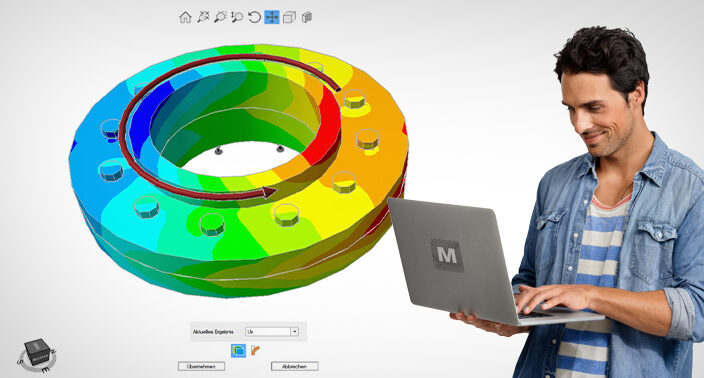
See what's behind the task
Graphical representations and 3D views help you understand geometries, loads, and technical relationships more quickly.

Record your results directly for your submission
Input data, calculation bases, and results are documented in a structured manner—which is useful for exercises, assignments, projects, and term papers.
Many topics. One app.
You have plenty to do—and doing technical calculations entirely by hand takes time. MDESIGN student supports you exactly where tasks become more complex.
From screws and shafts to bearings and gearings to strength, springs or pipelines: Many typical topics from college and vocational training are available to you right within the app.
View module overview


01 Reference Works, Databases, Materials & Strength
- Tolerances and fits
- Geometry, physics, statics and dynamics
- Material information and technical parameters
- Strength tests according to FKM
02 Screw, Weld, and Adhesive Joints
- Bolted joints and power screws
- Calculations in accordance with VDI 2230 and Eurocode
- Welded joints according to DVS, Eurocode, and FKM
- Adhesive, riveted and soldering joints
- Bolts and pins
03 Shafts , Axles & Bearings
- Shafts- and axle calculations
- Bearing reactions, bending, moments, and torsion
- Strength verification in accordance with DIN 743 and FKM
- Rolling and plain bearings
04 Shaft -Hub Connections
Design and verify various form-fit and force-fit connections between the shaft and the hub.
05 Gearings & Gears
Gearings determine dimensions, define geometries, and calculate and analyze different gear design concepts.
06 Belt- & Chain Drives
- Standard and narrow V-belts
- Toothed belt
- Roller chains
07 Springs Elastic
- Compression and extension springs
- Disc springs
- Torsion springs and torsion bars
08 Supports & Frames
- Statically determinate and indeterminate beams
- Frames and rods
- Moments of Inertia
09 Pipelines & Equipment
- Pipes and pressure vessel
- Calculations in accordance with AD 2000 and EN 13445
- Flange in accordance with AD 2000 and EN 1591
From calculation task to flawless documentation
Got an assignment involving a shaft, bolt, gear, or another machine element? With MDESIGN, you can worh through it step by step and see how the task develops into a complete engineering calculation.
Understand the task
What values are given, what are you trying to find, and what constraints do you need to take into account?
Set up calculation
Enter geometry, loads, and material data. Wizards and predefined data help you compile the correct information.
Review the results
Don't just get a number: view and understand calculation paths, safeties, and utilization rates to see why a result is generated.
Document the transfer
Clearly summarize inputs, calculation bases, and results—for exercises, projects, assignments, or term papers.
Three editions—varying levels of support
The Roloff/Matek and Decker editions focus on selected, textbook-based calculations. In addition, MDESIGN student offers you a comprehensive calculation environment with extra modules, digital aids, documentation, and project organization.
MDESIGN student

The comprehensive solution for technical problems, exercises, projects, and term papers.
View All Features Features
- Comprehensive calculation scope
- FKM strength verification
- MDESIGN technology
- MDESIGN mechanical
- MDESIGN bolt
- MDESIGN multibolt
- MDESIGN bearing
- MDESIGN gear
- MDESIGN shaft
- MDESIGN weld
- MDESIGN process
- MDESIGN espresso
- Full range of topics
- Parametric analysis
- German & English
- Digital assistants and input aids
- Technical databases and parameters
- Transparent and traceable calculation methods
- Complete calculation documentation
- Project organization for tasks and responsibilities
- Support for questions about usage
More features, more support, and more opportunities for your entire college experience.
Make the most of all the benefitsRoloff/Matek Edition

For selected calculations corresponding to the content of the textbook Roloff/Matek.
View Features Features
- Calculation scope based on textbooks
- Limited range of topics
- Selected machine elements
- Verifiable calculation results
- No full access to features
- Less digital assistance
- Focus on the reference book
- German only
Useful if you want to work specifically with the content from Roloff/Matek.
Start with reduced scopeDecker Edition

For selected calculations corresponding to the content of the textbook Decker: Machine Elements.
View Features Features
- Calculation scope based on textbooks
- Limited range of topics
- Selected machine elements
- Verifiable calculation results
- No full access to features
- Less digital assistance
- Focus on the reference book
- German only
Useful if you want to work specifically with the content from the Decker.
Start with reduced scopeThe full range of MDESIGN for €11.90
With MDESIGN student, you get more than just individual learning modules—you get a comprehensive calculcation environment for your studies or vocational training. Calculate, understand, document, and work on projects with significantly more capabilities than the free textbook editions.
Register, submit your proof of enrollment, and use MDESIGN student for your college or vocational training assignments.